
The web UI
The hub's web UI runs at http://localhost:8765 by default. On the hub PC it opens straight away; from other devices you sign in with your username and access key (see First run).
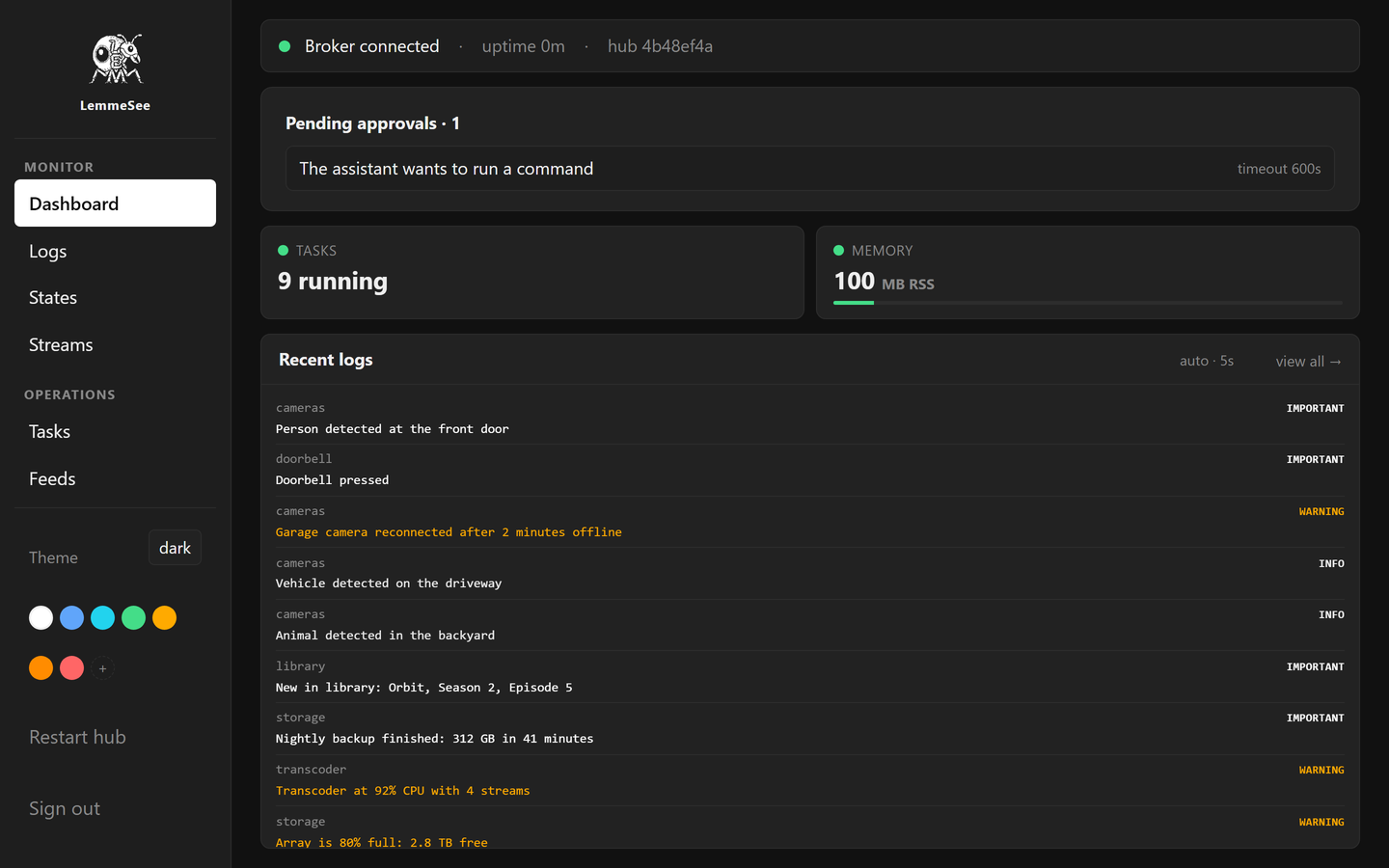
Layout
A sidebar on the left groups the pages into three sections. On a phone-sized screen it becomes a menu you open with the button in the top bar. When you have permissions to it, LemmeKnow's Monitor tab will include a LemmeSee button in the channel selector under its corresponding server. In this view, the menu button is built into the bottom left of the control bar directly.
| Section | Pages |
|---|---|
| Monitor | Dashboard, Logs, States, Streams |
| Operations | Tasks, Feeds, Webhooks, Filters |
| Admin | Users, Diagnostics |
You only see the pages your account is allowed to see, and edit buttons only appear where you may edit. See Permissions and grants.
At the bottom of the sidebar you'll find the theme switch (dark or light), a row of accent colors (including a custom one), Restart hub and Sign out. Your theme and accent are remembered by your browser.
The dot in the top bar shows whether the hub is connected to the MQTT broker.
Dashboard
The first page gives you the hub's health at a glance:
- Broker connected or disconnected, the hub's uptime, and its hub id (the server id that appears in every MQTT topic).
- Pending approvals, if any are waiting for an answer. See Approvals.
- A Tasks card: how many enabled tasks are running, and which daemons are restarting or not running.
- A Memory card showing the hub's memory use.
- The 20 most recent log entries, refreshed every five seconds.
Logs
The Logs page shows the last 100 log entries the hub has seen on the broker, refreshed every three seconds. Use the level buttons (Error, Warning, Important, Info, Debug) to show or hide each level, and type in the source box to filter by source. Clicking a source name filters to that source. You can also link straight to a filtered view with /logs?source=backup.
The page holds entries in memory, so it starts empty each time the hub restarts.
The other pages
| Page | What it's for |
|---|---|
| States | A read-only view of every state the hub's plugins publish. See States. |
| Streams | Live video streams, when the streams feature is configured. See Streams. |
| Tasks | Scripts, daemons, URL watchers, and plugins. See Tasks. |
| Feeds | Server feeds your phone can read and subscribe to. See Server feeds. |
| Webhooks | Endpoints that turn incoming HTTP requests into log entries. See Webhooks. |
| Filters | Try named filters on an RSS feed and inspect each step. See Named filters. |
| Users | Accounts, access keys, invites, and plugin keys. See Users. |
| Diagnostics | Process details for the hub: memory, threads, child processes, recent HTTP errors, and per-plugin information. Useful when something seems slow or stuck. |
Restart hub
Restart hub stops the hub, including every daemon it supervises, and starts it again in the background. Use it after editing config.json or adding webhook scripts, which the hub only reads at startup. The button appears only for users who may edit Diagnostics.