
Named filters
A named filter is a small Python script on the hub that takes a batch of feed items and returns the ones to keep, optionally changed. Filters can drop noise, merge duplicates, or add details to items. You can chain several, and the output of one becomes the input of the next.
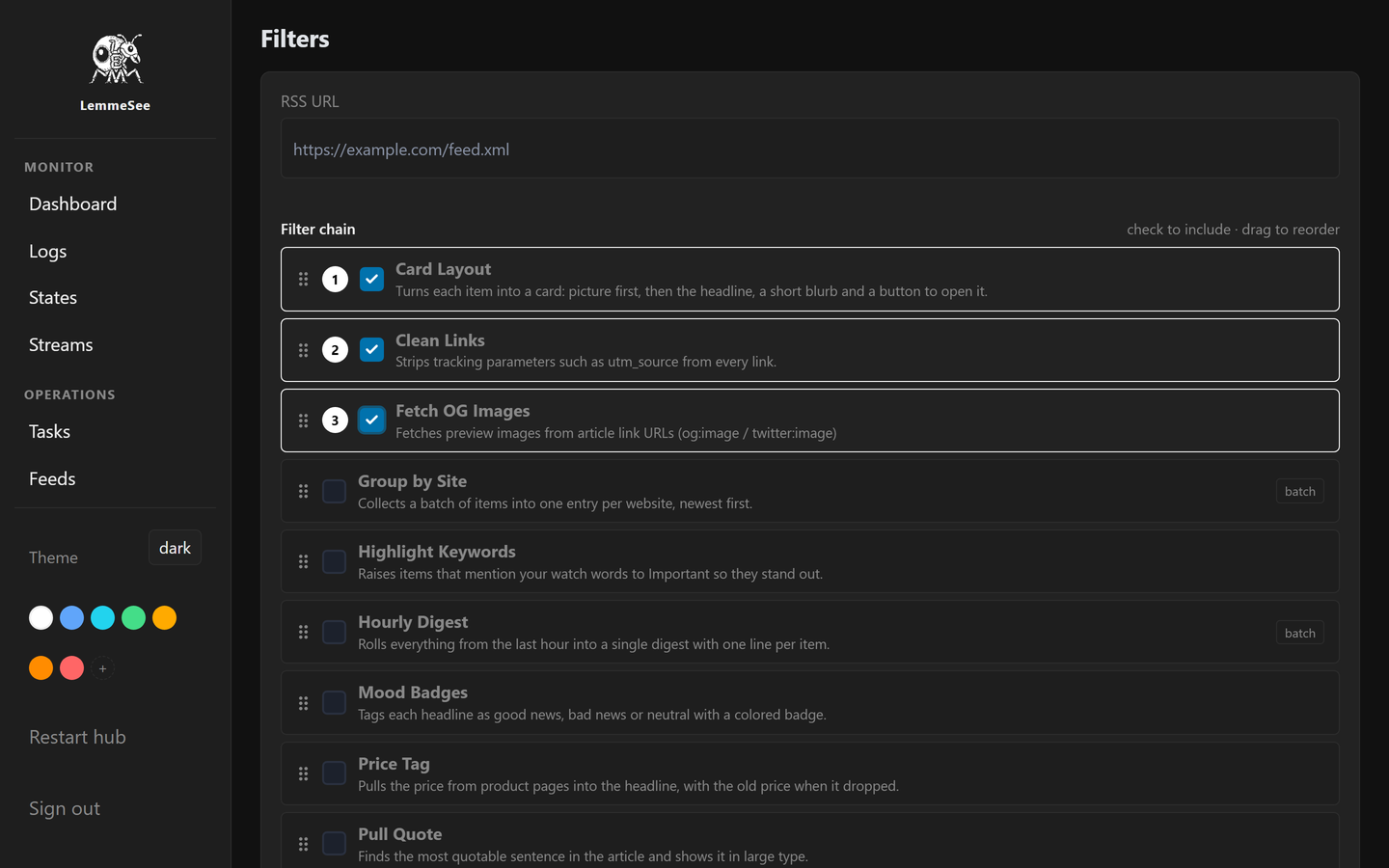
The same scripts serve three purposes:
- As
filter_scriptson a server feed, cleaning up items before the hub stores them. - Through the filter proxy, which LemmeKnow and your own tools call to run any RSS address or batch of items through a chain of filters. See RSS and Atom feeds for the phone side.
- On the hub's Filters page, a simulator that shows the items after every step.
Where filters live
The hub lists every .py file in its filters folder as a named filter. Set the folder with filters_path in config.json (see Configuration). When filters_path is set, only the filters in that folder are offered; when it isn't, the hub uses the filters bundled with it. The file name without .py is the filter's id.
The hub bundles two filters:
dedup_by_url: when several items share the samelink, it keeps the newest one, folds the older versions into its body, and adds aseen_count. Items without a link are always kept.fetch_og_images: for items with alinkand no image yet, fetches the linked page's preview image (og:imageortwitter:image) and attaches it.
Copy them into your own filters folder if you set filters_path and still want them.
Writing a filter
A filter reads a JSON array of items on standard input and writes a JSON array of items to standard output. It may return fewer items, change fields, or add fields of its own.
FILTER_NAME        = "Drop sponsored"
FILTER_DESCRIPTION = "Removes items whose title starts with Sponsored."

import json
import sys


def run(items):
    return [i for i in items
            if not i.get("title", "").lower().startswith("sponsored")]


if __name__ == "__main__":
    json.dump(run(json.load(sys.stdin)), sys.stdout)
The hub runs the script with its own Python interpreter. Keep the real work under if __name__ == "__main__":, because the hub also loads the file to read its settings.
Rules the hub follows:
- Scripts run once per scan with only the new items, not once per item.
- Exit code 0 means success. A non-zero exit, a timeout, or output that isn't a JSON array counts as a failure: that script's output is ignored and the next script runs on the items the failed one received.
- A script is stopped after 30 seconds unless it sets
FILTER_TIMEOUT.
Items
Each item is a JSON object. These fields are always present; RSS items also carry guid, link and, when thumbnails are on, media_url.
| Field | Meaning |
|---|---|
id | Unique id of the item. |
title | Summary line. |
content | The body: a JSON string holding a list of blocks, or an empty string. |
level | debug, info, warning, or error. |
ts | Time in milliseconds. |
Body blocks look like this:
[
  {"type": "text",  "level": "info", "text": "A line of text"},
  {"type": "link",  "label": "Open", "url": "https://example.com/post/1"},
  {"type": "image", "url": "https://example.com/thumb.jpg"}
]
A filter can also add actions to an item to give it buttons on the phone. See Server feeds.
Settings in the filter file
Put these at the start of a line near the top of the file. FILTER_TIMEOUT, FILTER_CHUNK_SIZE, and FILTER_WAIT_FOR_ALL are read from the first 30 lines only.
| Setting | Meaning |
|---|---|
FILTER_NAME | Display name. Default: the file name in title case. |
FILTER_DESCRIPTION | Description shown on the Filters page and on phones. |
FILTER_PRIVATE | True: users need a named_filters.private.<id> grant to see the filter. |
FILTER_BATCH | True: tells LemmeKnow the filter works on the whole batch rather than item by item. |
FILTER_PASS_SEEN | True: the proxy also passes items the caller has already seen, tagged "__seen__": true. Mark one "__superseded__": true to have phones retire it. |
FILTER_LOG_DROPS | False: don't log the items this filter drops. Default True. |
FILTER_TIMEOUT | Seconds before the script is stopped. Default 30. |
FILTER_CHUNK_SIZE | Split batches larger than this into chunks and run them in parallel, keeping their order. |
FILTER_WAIT_FOR_ALL | True: always run the whole batch in one call, overriding FILTER_CHUNK_SIZE. |
The Filters page
Pick filters, drag them into order, enter an RSS address, and click Run. The page shows one tab for the input, one per filter with the items left and how many it dropped, and a Results tab rendered the way phones show them. Nothing is stored or sent to phones.
The filter proxy
POST /api/named-filters/proxy runs a chain of filters and returns the result. It needs a signed-in user (see REST API) and allows 10 calls per minute per address.
| Field | Meaning |
|---|---|
filter_ids | Required. Filter ids in the order to run them. |
rss_url | Fetch this RSS or Atom address and filter its items. |
items | Or: filter this list of items instead. Send exactly one of rss_url and items. |
seen_guids | With rss_url: guids the caller already has. They are skipped (or passed tagged as seen to filters with FILTER_PASS_SEEN). |
mqtt_feed_id | Also publish the result to phones as an update of this feed id. |
mqtt_feed_visibility | public (default) or private, for mqtt_feed_id. |
steps | true: return the items after each filter instead of the final result. |
curl -X POST http://localhost:8765/api/named-filters/proxy \
  -H "X-Access-Key: YOUR_ACCESS_KEY" -H "X-Username: alice" \
  -H "Content-Type: application/json" \
  -d '{"filter_ids": ["dedup_by_url"], "rss_url": "https://example.com/feed.xml"}'
The response is {"items": [...], "dropped_guids": [...]}, where dropped_guids lists guids the filters removed or retired. With steps: true it is {"input_items": [...], "steps": [{"filter_id", "filter_name", "items", "dropped_count"}, ...]}.
An unknown filter id answers 404, a missing filter_ids or source answers 422, and a chain that runs longer than 110 seconds answers 504. The proxy keeps no state between calls.
GET /api/named-filters lists the filters you can see, each with id, name, description, batch, and private.