
Tasks
A task is something the hub runs for you. Each task has a type, a name, an on or off switch, and settings for its type. Tasks are stored in the hub's database, start automatically when the hub starts, and are managed on the Tasks page.
Task types
| Type | Shown as | What it does | Schedule |
|---|---|---|---|
script | Script | Runs a Python script, waits for it to finish, and records the result. | Every N minutes, or cron |
daemon | Daemon | Starts a long-running Python script and restarts it if it crashes. | Runs continuously |
urlwatch | URL Watcher | Fetches a web page and sends an alert when it changes. | Every N minutes, or cron |
plugin | Plugin Script | Runs one of the hub's plugins. | Runs continuously |
relay | Relayed server | Passes another LemmeKnow Server's messages, pushed in through a Mosquitto bridge, on to phones. See Relayed servers. | Runs continuously |
Scripts and daemons are covered in depth in Scripts and daemons, URL watchers in Watchers, and schedules in Scheduling.
The Tasks page
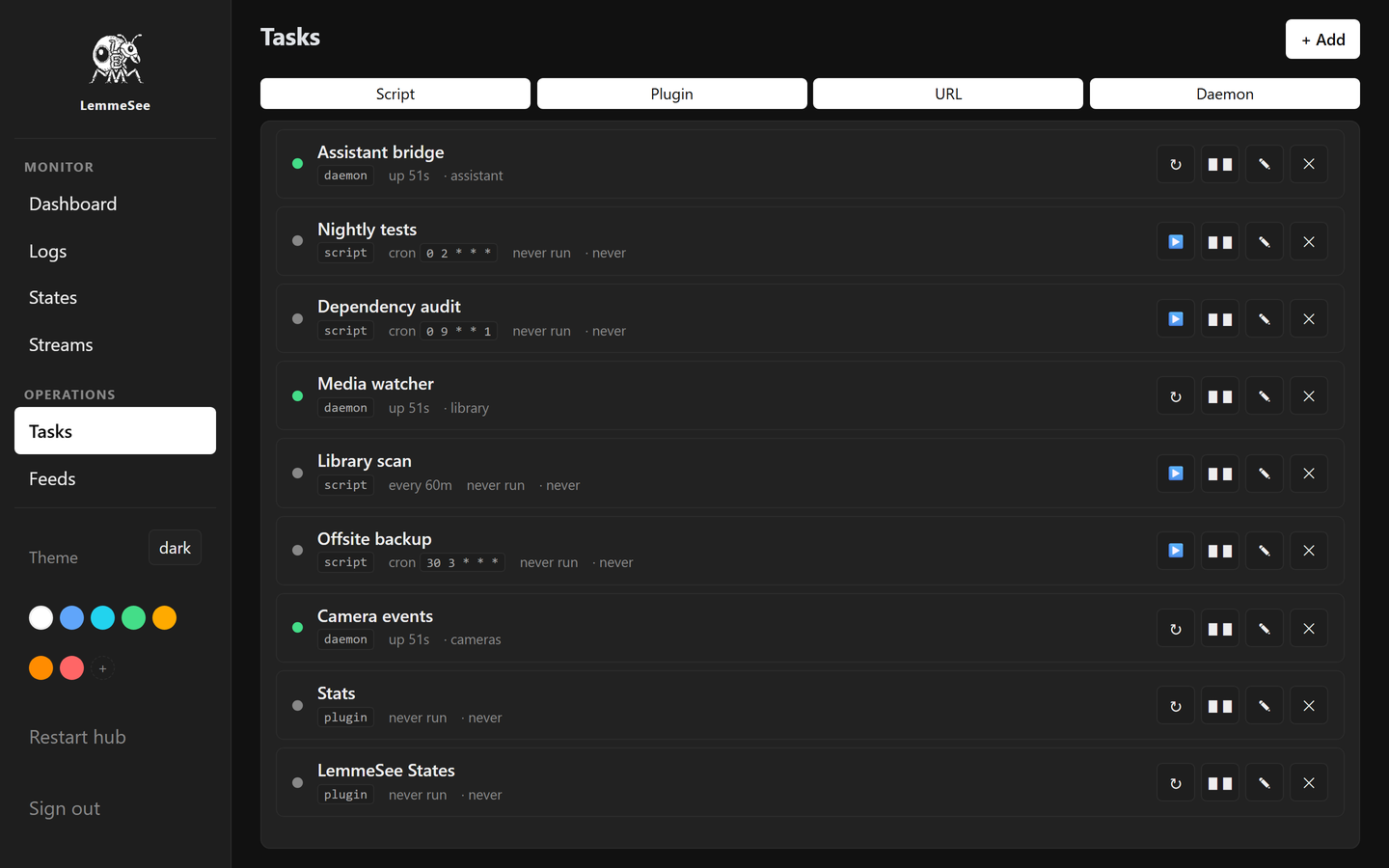
Each task is a card showing its name, type and status. The buttons along the top filter the list by type.
| Type | The card shows |
|---|---|
| Script and URL watcher | The schedule (every 5m or the cron expression), when it last ran, and ok or error from that run. |
| Daemon | running with its uptime and restart count, or starting, restarting, or stopped, plus its log source, which links to the Logs page filtered to it. |
| Plugin Script | Its status, plus a button for each page the plugin offers. In a browser they open in a new tab. In LemmeKnow, a page the app can show opens in the same view, and any other page opens in your phone's browser, already signed in. |
| Relayed server | waiting for <server id> until its bridge sends something, then receiving <server id> with how long ago its last heartbeat arrived, and a count of messages dropped by the relay's checks. The key button opens Bridge setup. |
The colored dot is green when all is well, yellow while a daemon restarts, and red after an error or when an enabled daemon isn't running. A switched-off task has no color.
Drag a card by its handle on the left to reorder the list. The order is saved, and the hub starts enabled tasks in that order, top to bottom.
Each card has these buttons, if you may edit tasks:
- Run now (scripts and URL watchers) runs the task immediately, outside its schedule.
- Restart (daemons, plugins, and relayed servers) stops the task and starts it again.
- Enable or Disable (Start or Stop for daemons) switches the task on or off. Off tasks keep their settings but don't run.
- Edit opens the task's settings. You can change everything except the type.
- Delete removes the task after asking you to confirm. A running daemon is stopped first.
+ Add opens the Add Task dialog: give the task a name, pick a type, fill in its settings and, for scripts and URL watchers, a schedule.
Settings by type
script
| Field | Required | Meaning |
|---|---|---|
path | yes | The .py file to run, as a full path or relative to the hub folder. |
source_name | no | The log source its output is filed under. When it's blank or left out, the task's name is used. |
args | no | A list of command-line arguments passed to the script. Set through the API only. |
daemon
| Field | Default | Meaning |
|---|---|---|
path | required | The .py file to run, as a full path or relative to the hub folder. |
source_name | detected | The log source for its output. When blank, the hub looks for a log_client.SOURCE = "name" line in the script, then falls back to the file name without .py. |
restart_delay | 5 | Seconds to wait before restarting after a crash. |
capture_output | false | Forward the script's printed output to the hub as debug log entries. |
urlwatch
| Field | Default | Meaning |
|---|---|---|
url | required | The page to watch. |
mode | hash | hash (any change in the page's text), selector (the text of one element) or keyword (a word appearing or disappearing). |
selector | none | CSS selector, for selector mode. |
keyword | none | The word to look for, for keyword mode. Not case-sensitive. |
alert_level | important | Log level of the alert. The form offers important, warning, and error. |
js | false | Load the page in a headless Chromium browser so JavaScript runs first. |
wait_for | none | With js on, a CSS selector to wait for (up to 10 seconds) before reading the page. |
plugin
| Field | Meaning |
|---|---|
script | The plugin's name: its file name without .py, in the folder set by plugins_path. The form lists the plugins it finds there. |
| other keys | The plugin's own settings. When the plugin declares them, the form shows a field for each and the hub checks them when you save. Otherwise you can enter them as JSON. |
See Installing hub plugins and Writing a LemmeSee plugin.
relay
| Field | Meaning |
|---|---|
server_id | The relayed server's 8-character server id. Required. |
allow_from | Address ranges its bridge may sign in from. Empty means private networks. |
Bridge settings, with the relay's publish key, come from Bridge setup on the card, or POST /api/relays/{id}/bridge. See Relayed servers.
Tasks over the API
Everything on the Tasks page is also available through the REST API, for users allowed to edit tasks. A task looks like this:
{
  "id": "5f0c2c1e-8a8e-4d0b-9f43-0b6f5d1f7a10",
  "name": "Nightly backup",
  "type": "script",
  "enabled": true,
  "schedule": { "type": "cron", "cron": "0 2 * * *" },
  "config": { "path": "/path/to/backup.py", "source_name": "backup" },
  "last_run": "2026-10-23T02:00:04.812345+00:00",
  "last_status": "ok",
  "last_message": null
}| Field | Meaning |
|---|---|
id | Assigned by the hub. |
name | Display name. |
type | script, daemon, urlwatch, plugin, or relay. |
enabled | On or off. Defaults to true when creating. |
schedule | For scripts and URL watchers, {"type": "interval", "minutes": 5} or {"type": "cron", "cron": "..."}. Always null for daemons, plugins, and relayed servers. See Scheduling. |
config | The settings for the type, as above. |
last_run | When it last ran, in UTC, or null. |
last_status | never, ok, or error. |
last_message | The error from the last failed run, or null. |
| Method | Path | What it does |
|---|---|---|
GET | /api/tasks | List tasks. |
GET | /api/tasks/{id} | One task. |
POST | /api/tasks | Create a task from name, type, enabled, schedule, and config. |
PATCH | /api/tasks/{id} | Change name, enabled, schedule, or config. A config you send replaces the whole config. |
DELETE | /api/tasks/{id} | Delete a task. |
POST | /api/tasks/{id}/toggle | Switch a task on or off. |
POST | /api/tasks/{id}/run | Run now, or restart a daemon, plugin, or relayed server. |
POST | /api/tasks/reorder | Body {"ids": [...]}: put those tasks in that order. Tasks you can't see keep their places. |
A script or URL watcher created through the API without a schedule runs every 5 minutes. Users who may see tasks but not edit them get the list without each task's config. See the REST API for authentication and the remaining endpoints.