
Delivery Screens
Delivery Screens are a Premium feature.
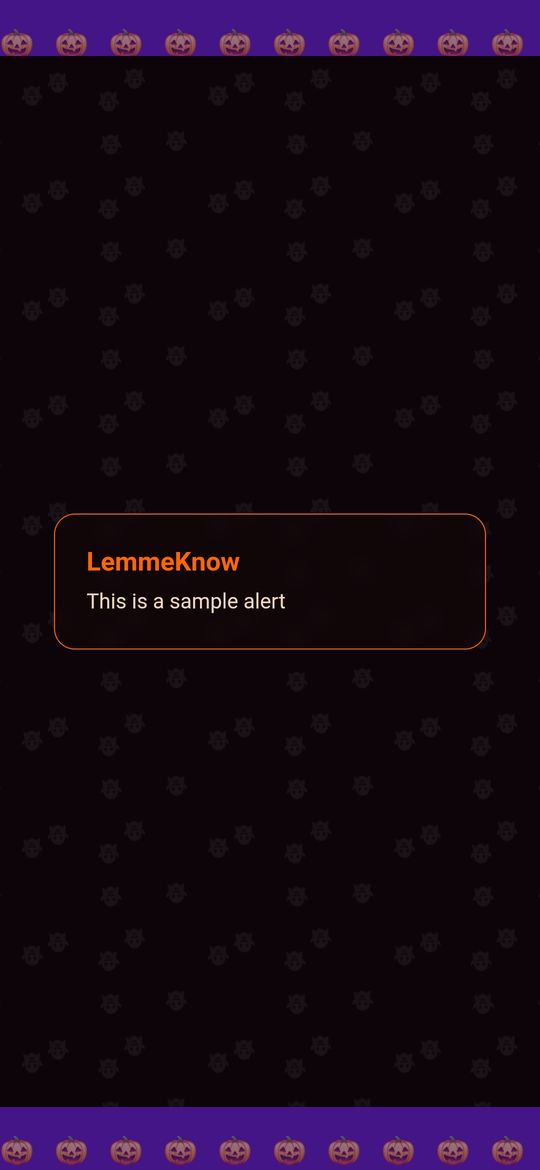
A Delivery Screen replaces a plain lock screen notification with a full-screen presentation of your own choosing. Tapping anywhere on the screen when one is displayed, dismisses it and shows your lock screen. When an alert or nudge fires while your phone is locked and asleep, the screen wakes and shows the Delivery Screen with the alert's title and message instead, allowing for an endless amount of customization for as many or few message types as you'd like!
Getting Delivery Screens
Delivery Screens come from plugins. Install them from a plugin package with Install Plugin Package in Settings (see Plugin packages), or from a LemmeSee hub that offers plugins. A few example Delivery Screens are available to download on the Downloads page.
Before installing, LemmeKnow shows a review of everything in the plugin. For a Delivery Screen you can play it with a sample alert first. If a screen keeps the display on, the review also shows for how long.
Want to build your own? See Delivery Screen pages.
Adding a Delivery step
Delivery is a step, like Vibrate or Sound. You can add it to:
Tap Delivery in the rule's step list to open the step dialog:
| Setting | What it does |
|---|---|
| Delivery Screen | Which installed screen to show |
| Theme | Current theme uses the app's theme; or pick a built-in, plugin, or custom theme for this step. Once you have saved playlists, switch to Playlist to show one of a playlist's themes each time, at random or in order as the playlist is set Coming soon |
| Show palette bars | Shows the palette bars along the top and bottom edges of the Delivery Screen |
| Bar slide-in time | With palette bars on, how long the top bar takes to slide down from the top edge and the bottom bar to slide up from the bottom edge as the screen opens, over the screen's edges. Off shows them immediately. |
| Keep the screen on | Keeps the display on for up to the number of seconds the screen asks for. Only shown for screens that use it. |
| Screen settings | Any options the screen offers, such as text, colors, images, sounds, or fonts. Text options can include tokens. |
| Volume and Stream | How loud the screen's sound plays, and on which stream. Only shown for screens with sound. |
Test opens the screen with a sample alert so you can see the result.
If no Delivery Screens are installed, you'll see No Delivery Screens installed. If a step's screen has been uninstalled, the step shows ⚠ Delivery Screen not installed.
When a Delivery Screen appears
A Delivery step shows its screen only when:
- the phone is locked and the display is off,
- the screen is still installed, and
- LemmeKnow has the Full-screen notifications permission.
Otherwise the step is skipped and the rest of the sequence carries on. Because the first delivery wakes the display, later passes of a repeating alert skip the Delivery step until the screen turns off again.
If triggered by a notify rule in Relay mode, when the Delivery Screen is going to appear, the notification itself is posted silently so the Delivery Screen gets your attention before you see the normal notification. This allows it to act as a full replacement to standard notification previews.
Full-screen permission
Android requires permission for an app to show screens over the lock screen. If it's missing, the Delivery step dialog says Delivery steps need the Full-screen notifications permission so the screen can appear over the lock screen with a Grant full-screen permission button. See Permissions.
Privacy
Since a Delivery Screen is a local HTML file, it runs sealed off from the network and filesystem writes to execute securely. It can only load its own files and the plugin's declared sounds, images and fonts, and it can't contact any server or write any files, so the alert text it displays never leaves your phone.