
Custom actions
Custom actions are a Premium feature. A custom action is a named, reusable step that alert and nudge rules can run alongside their built-in steps such as vibrate or sound. An action can call a web address (a Webhook action) or do something on your phone (a System action), such as turning on Do Not Disturb or flipping a quiet rule switch.
Managing actions
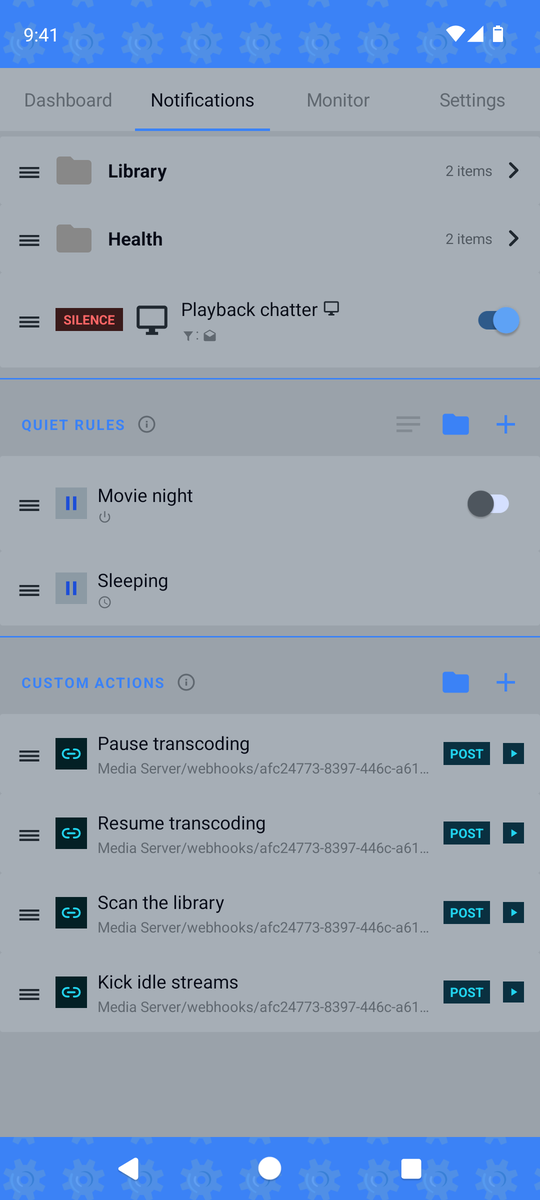
Your actions live in the Custom actions section at the bottom of the Notifications tab.
- Tap + to add an action, or the folder icon to create a folder for them.
- Long press an action to open the editor.
- Tap the play button on a row to run the action right away, after a confirmation.
- Drag the handle to reorder.
Actions can also be placed on the Switch Board home screen widget, where one tap runs them. See Widgets.
The action editor
| Field | Description |
|---|---|
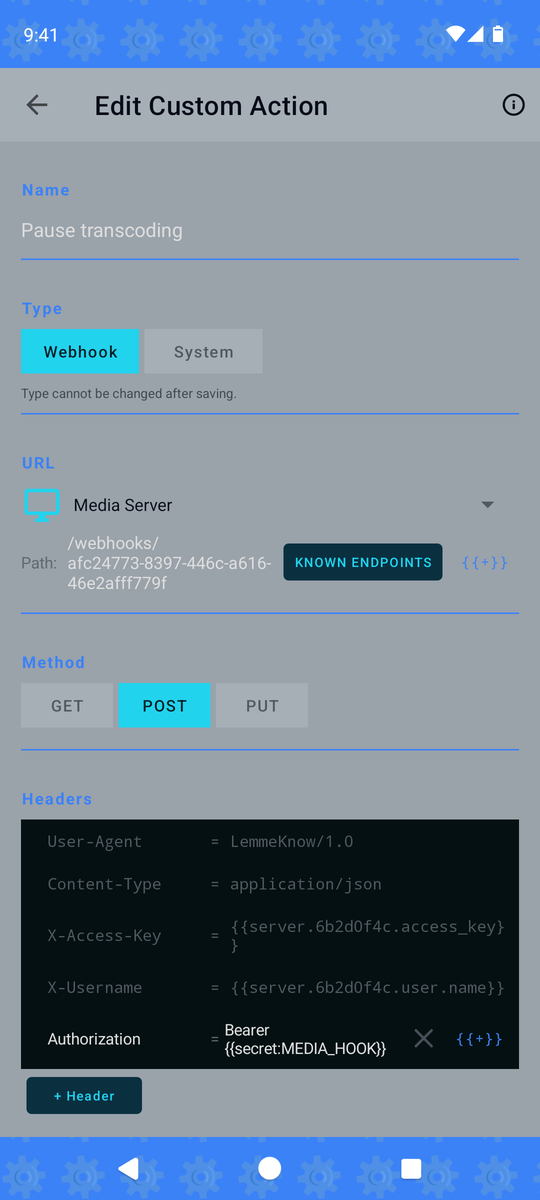
| Name | Required. This is how the action appears when you add it to a rule. |
| Type | Webhook or System. Type cannot be changed after saving. |
The rest of the editor depends on the type.
Webhook actions
A webhook action sends an HTTP request.
| Field | Description |
|---|---|
| Target | Where the request goes: one of your servers, This device, or Custom. |
| Path | For a server or This device: the path to call, for example /api/endpoint. |
| URL | For Custom: the full address, for example https://hooks.example.com/notify. |
| Method | GET, POST, or PUT. With This device selected, Ad-Hoc is also offered. |
| Headers | Request headers as key and value rows. |
| Body fields | The request body as key and value rows. |
Every URL, path, header value, and body value has a Token Builder button that inserts tokens for you.
Targets
| Target | Request address |
|---|---|
| A server | The server's Hub URL followed by the path, so the request reaches the LemmeSee hub behind it. A path that starts with :port, such as :8080/status, calls that port on the same host instead. Your sign-in for that server is added for you. |
| This device | http://127.0.0.1 followed by the path, for a server you run on the device itself. |
| Custom | The URL exactly as you enter it. |
A server or This device path must start with / or :port. Anything else is refused with "A hub path must start with / or :port."
When the target's hub publishes its webhooks, the editor lists them under Known endpoints, and picking one fills in the path and the fields it expects.
Tokens in the address
Tokens can go in the path or the query string, after the host. They can't be part of the scheme or host, so incoming text can never change where a request goes. The one exception is a secret: a Custom URL can start with a secret that holds the whole scheme and host, for example {{secret:BACKUP_HOST}}/api/start. A backslash isn't allowed in the address part either. The editor won't save or run an address that breaks these rules and will print an error if you attempt to do so.
Headers
The headers section starts with locked rows that LemmeKnow sends for you:
| Header | Value |
|---|---|
User-Agent | LemmeKnow/1.0 |
Content-Type | application/json |
X-Access-Key | Your access key for the server. Server targets only. |
X-Username | Your username on the server. Server targets only. |
Tap + Header or Custom to add your own rows. Header values accept tokens and secrets. A header you add with the same name as a locked one wins.
Authorization = Bearer {{secret:API_KEY}}
X-Trace-Id    = {{rule.name}}
Body fields
Body fields become a JSON object sent with POST and PUT requests. GET requests send no body. Each row is a key and a value; values are sent as text after tokens and secrets are filled in. The chips above the list add common rows:
| Chip | Key | Value |
|---|---|---|
| Source | source | {{source}} |
| Payload | payload | {{payload}} |
| Level | level | {{level}} |
| Topic | topic | {{topic}} |
| Timestamp | timestamp | {{now.timestamp}} |
| Rule name | rule | {{rule.name}} |
| Server | server | {{server}} |
| Custom | (empty) | (empty) |
| Object {} | data | A nested object with its own rows. |
For example, these rows, where details is an Object {} row with one row inside it:
source  = {{item.source}}
message = {{item.message}}
rule    = {{rule.name}}
details
  host  = {{server.current.name}}
send this body:
{
  "source": "backups",
  "message": "Nightly backup failed",
  "rule": "Backup errors",
  "details": { "host": "Build server" }
}
When you start an action from the All Fields template, the body is filled with source, message, level, timestamp, rule, and server rows already pointing at the matching tokens.
For the full list of tokens, see Token Builder. For secrets, see Secrets Manager.
Ad-Hoc scripts
With This device as the target, Ad-Hoc runs a JavaScript file stored on your phone instead of sending a request. Tapping Ad-Hoc lets you pick the file. Inside the script:
BODYholds the action's body fields as an objectTRIGGERholds the request or feed item that triggered the rule, when there is one- each of your secrets is available as a variable named after its key (exercise caution when selecting what you send to a script)
- set
resultto return a value; objects are returned as JSON print()andconsole.log()output appears in the Dashboard history
Responses
A webhook succeeds when the server answers with a 2xx status. Requests give up after 30 seconds. The result appears in the Dashboard's history with the method as its badge, the status code and the start of the response. Secret values that shows up in text are replaced with *** before it is shown or stored. Be sure to use longer, unique secret values so matching same word text in redacted parts of the app don't accidentally expose your secret.
Later steps in the same sequence can use the result through the tokens {{previous.http.status}} and {{previous.http.response}}.
System actions
A system action does something on your phone that can't simply be scripted. Pick it from the System Action list; its fields appear below with help for each.
| Action | Fields | What it does |
|---|---|---|
| Dismiss Alerts | none | Dismisses every alert, including queued ones, and clears all LemmeKnow notifications on this device. Your wearable clears too. |
| Set Switch | switch, state | Turns the Switch condition of a quiet rule on or off, or toggles it. switch is the quiet rule's name, matched exactly. state is on, off, or toggle (the default). Fails with "No switch named ..." if no quiet rule matches. |
| Do Not Disturb | mode | Sets Do Not Disturb: on, off, priority, or alarms. Needs Do Not Disturb access. |
| Ringer Mode | mode | Sets the ringer to normal, vibrate (the default) or silent. Switching to or from silent needs Do Not Disturb access. |
| Media Control | command | Sends a media button press to whatever app is playing: play_pause (the default), play, pause, next, previous, or stop. |
| Open URL | url | Opens a URL in the default browser or app. |
| Launch App | package | Brings an app to the foreground by package name, for example com.example.app. |
| Send Broadcast | action, package, any others | Sends an Android broadcast. action is the intent action. package is optional and limits delivery to one app. Every other field is passed as a text extra. |
| Copy to Clipboard | text | Copies text to the clipboard. |
All fields accept tokens and secrets. Hub plugins installed on your phone can add their own entries to this list, named Plugin: followed by the plugin's name; see Plugins on your phone.
When Do Not Disturb or Ringer Mode is selected and LemmeKnow doesn't have Do Not Disturb access, the editor shows a Grant Do Not Disturb access button. If the action runs without access, it opens the access settings and reports a failure.
Later steps can read what these actions changed: {{previous.dnd.mode}} holds the Do Not Disturb mode from before a Do Not Disturb step, which is handy for restoring it afterwards.
Saving, running, and deleting
- Save Action saves the current action being created or edited. A name is required, and webhook actions need a URL or path.
- Save as new action saves a copy and leaves the original untouched.
- Execute runs the action exactly as if a rule had fired it, using what is in the editor, even if you haven't saved yet. You are asked to confirm first.
- Delete Action removes the action. LemmeKnow offers to delete it and copy its settings into each of those rules instead.
When you save an action that rules already use, the Action in use dialog asks how to apply the change:
| Choice | Effect |
|---|---|
| Save as new action | Saves your edit as a separate action and leaves the rules on the original. |
| Detach rules | Copies the original settings into each rule as an inline step, then saves your edit. |
| Update rules | Saves your edit; every rule using the action picks it up. |
Using actions in rules
In an alert or nudge rule, add an Action step to the sequence and pick a saved action from the list. You can also configure a step inline for just that rule; it then shows "Inline configuration" in the rule editor. See Alerts and Nudges.
An action step runs once per alert, even though the rest of an alert's sequence repeats. Its Configuration Only settings apply to that rule alone:
| Setting | Effect |
|---|---|
| Auto-dismiss on success | The default. If the action succeeds, the alert is dismissed. |
| Continue on success | The alert keeps going after the action succeeds. |
| Override URL (optional) | Sends this rule's request to a different URL. Follows the same token rules as the action's own URL. |
Importing actions
When you import a configuration that contains actions or rules calling addresses nothing on your phone calls yet, LemmeKnow lists those addresses under New request destinations and only imports if you accept. See Secrets Manager for how action headers and bodies travel in an export.